





-
 Pick up from Saudi AV Tech warehouses
-
Express delivery
-
Express delivery by DHL
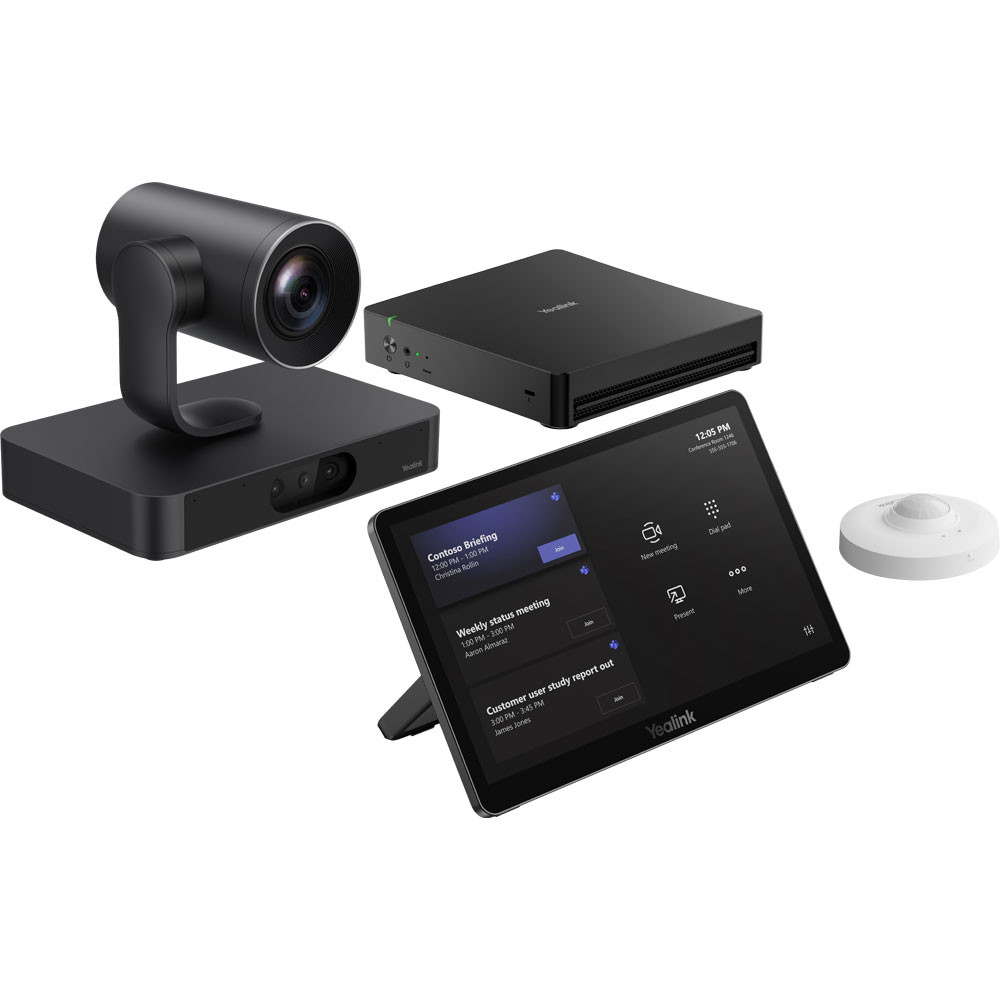
Yealink MVC S80 includes RoomSensor for automatic detection, AVHub processor, AI features such as IntelliFocus, Speaker Tracking, Presenter Tracking, Auto Framing, support for 3x HDMI output with CEC and HDMI-in for 4K content, Wi-Fi 6, Bluetooth 5.2. Ideal for large rooms with Yealink RoomConnect centralized management.

Hurry up to order the product and get a discount of up to 30%
Sale_coupon_15
 Pick up from Saudi AV Tech warehouses
 Same day delivery
Free
 Express delivery
 Products will be delivered to the location specified by the customer.
3 working days
Free
 Express delivery by DHL
 DHL delivers the products to the specified location.
3 working days
My trials
 2-year warranty
 More details
 Return within 30 days
 More details
Payment Methods:

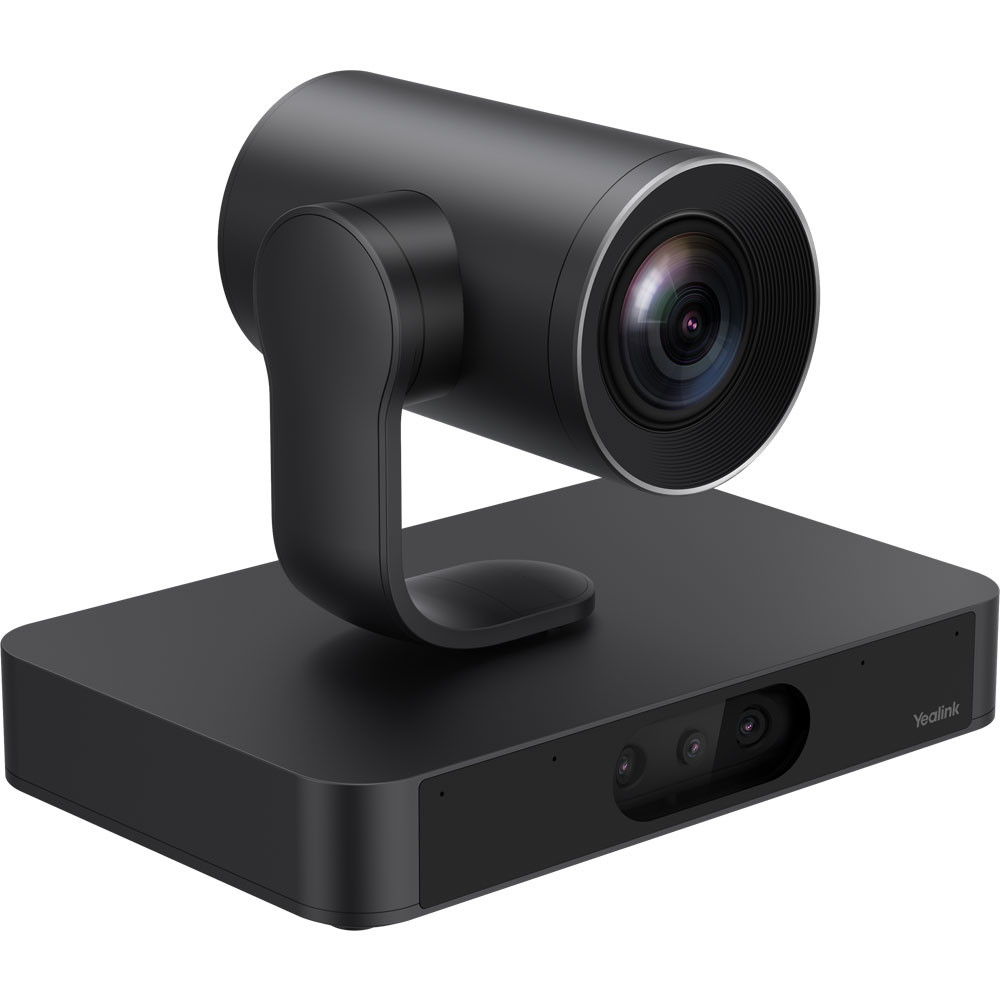
MVC S80 designed for professional large rooms, with SmartVision 80 (3+1 eye PTZ camera, 20x optical zoom, 4K, 48Tops QCS8550, 4-mic array, NDI|Dante, AI: IntelliFocus, Speaker Tracking, Video Fence, PiP), MCore 4 (34Tops NPU, 3x HDMI out, 1x HDMI in, 4x USB3.0, MTouch RJ45), MTouch Plus (11.6″ IPS 1920×1080, HDMI/USB-C input, wireless sharing with WPP30, 30°-70° angle). RoomSensor detects occupancy and environmental data (temperature, humidity).
Supports Teams Rooms app, professional audio compatibility (Biamp/Shure), multi-screen control, BYOD, remote management, compatible with Microsoft Teams ProAV rooms, PoE support, wall-mount/table deployment (various dimensions depending on components).
Yealink MVC S80 gives organizations the opportunity to adopt Microsoft Teams Rooms on Windows with all of its advanced features in small and medium-sized meeting rooms for up to 6-8 people, the most prevalent category in modern work environments. While many organizations turn to simpler Android solutions for their small rooms, MVC S80 gives IT teams a strategic choice to unify all meeting rooms on a single Windows platform – from the smallest room to the largest room – with a unified experience and consistent centralized management.
The system is based on a Windows MCore Pro CPU customized to run Teams Rooms seamlessly, with a built-in UVC34 smart camera for high-resolution, wide-angle performance designed specifically for small and medium-sized rooms. The camera includes AI Auto-Framing that recognizes participants and automatically adjusts the image frame, Intelligent Speaker Tracking that focuses on the person speaking, and IntelliFrame that displays each participant in a clear individual frame.
The system includes microphones built into the camera unit with advanced echo cancellation and noise isolation, optimized to clearly capture the voices of all participants in small to medium-sized rooms. The CTP18 touch control panel completes the experience with an intuitive Teams interface that enables one-touch meeting initiation, camera control, and content sharing.
What makes MVC S80 a smart strategic choice is that it opens the door for organizations to unify their entire meeting room platform on Windows. Instead of managing two different environments – Android for small rooms and Windows for large rooms – MVC S80 enables IT teams to deploy a unified Windows platform across all rooms, simplifying management, updates and technical support and ensuring a consistent user experience everywhere.
The system supports dual screens, wired and wireless content sharing, integration with Microsoft Whiteboard and OneNote, and meeting scheduling via Outlook calendar. It is fully managed via the Microsoft Teams Admin Center and Yealink Device Management platform with automatic updates and proactive monitoring.
Why IT managers and procurement officers choose Yealink MVC S80
Enables the adoption of Teams Rooms on Windows in small and medium-sized rooms with a cost-effective configuration
Unlocks all the advanced Teams Rooms features on Windows including dual screens and IntelliFrame
Unifies the entire meeting room platform on Windows – from the smallest room to the largest auditorium
Includes a smart UVC34 camera with auto-framing and AI speaker tracking
Scalable modular architecture that protects an organization’s long-term investment
Simplifies management and technical support by unifying the platform instead of managing the Android and Windows environments
Certified for Microsoft – “Certified for Microsoft Teams Rooms”
Main advantages
Teams Rooms on Windows for SMB rooms – Unlocks all advanced Windows features including dual screens, Smart Gallery and IntelliFrame in a configuration optimized for the most prevalent rooms in organizations
Unifying the entire meeting room platform – Enables IT teams to deploy a unified Windows platform across all rooms instead of managing two different environments (Android + Windows), simplifying management and support
UVC34 smart camera optimized for small rooms – high resolution and wide angle of view with auto-framing, speaker tracking and IntelliFrame with performance customized to room size
Built-in microphones with advanced echo cancellation and noise isolation – Capture the voices of all participants with crystal clarity optimized for small and medium room dimensions
Dual screen support – View participants and shared content on two separate screens simultaneously even in small rooms for a more productive experience
CTP18 Touch Control Panel – An intuitive Teams interface that lets you start meetings, control the camera, share content, and access the calendar with one touch
Unified centralized management via Teams Admin Center and Yealink RMM – Manage all meeting rooms (small, medium and large) from a single dashboard with a unified Windows platform
 Overview
 | Model | MVC S80 |
|---|---|
| Manufacturer | Yealink |
| Device Type | |
| System OS | Windows 11 IoT Enterprise |
| RAM/ROM | 16GB/265GB |
| Cameras | Yealink SmartVision 80 intelligent four-lens PTZ camera |
| Dimensions | |
| Connection Protocol | Wi-Fi |
| Compatible Models |
 Processor
 | Model | MVC S80 |
|---|---|
| Manufacturer | Yealink |
| Device Type | |
| System OS | Windows 11 IoT Enterprise |
| RAM/ROM | 16GB/265GB |
| Cameras | Yealink SmartVision 80 intelligent four-lens PTZ camera |
| Dimensions | |
| Connection Protocol | Wi-Fi |
| Compatible Models |
Show only reviews in English ()
 Brands

By Team
Connect with more potential customers and close deals.
Reduce churn with AI software
Simplify operations with advanced features.
By industry
Easy global outreach with AI capabilities
Protect financial info and ensure solid CX.
Unlock new markets and faster outreach.
Top-tier outreach to drive enrollment.
By Use
Run remote ops with a calling software.
Speed up lead gen with a business call system.
Make your customers happier with the #1 AI CRM
By size
Grow revenue and improve CX.
Provide local presence and reach more markets.
 English
No account yet?
Create an Account


Reviews
Clear filtersThere are no reviews yet.